


USB-C Dual Video MST Docking Station with PD Charging


USB-C Dual Video MST Docking Station with PD Charging is backordered and will ship as soon as it is back in stock.
Couldn't load pickup availability
Product Features
USB-C Docking Station
USB-C Docking Station
Dual 4K HDMI
Dual 4K HDMI
Superb Resolutions
Superb Resolutions
Continuous Power Support
Continuous Power Support
Wide Applications
Wide Applications

USB-C Dual Video MST Docking Station with PD Charging
Estimated shipping by October 13, 2026
-

45 Days Free Return
-

2 Years Warranty
-

Lifetime Technical Support


USB-C Dual Video MST Docking Station with PD Charging
Provides one USB-C 10Gbps with 5V/1.5A charging, one USB-C 10Gbps, one USB-A 10Gbps with 5V/1.5A charging, and one USB-A 5Gbps ports to enhance the performance and transfer capability of USB devices
60W Power Delivery
Includes a high quality USB-C 5Gbps to USB-C cable for connecting laptop/notebook, supports up to 60W Power Delivery charging for laptop, notebook, tablet, and smartphone. The included 96W power adapter ensures enough power for laptop charging and USB peripherals
3.5mm Headset Jack
Supports one 3.5mm headset jack for 2 channel stereo audio and microphone connection
1G Ethernet Data Transmission
Reliable wired network connectivity through embedded 10/100/1000BASE-T Gigabit Ethernet port
Memory Card Slots
Compatible with SD 3.0 UHS-1 and Micro SD (TF) 3.0 UHS-1 memory card and data transfer rate up to 104MB
Maximum Compatibility
- Compliant with mac® M1, M2, M3 Pro & Max systems and Mirror mode only
- Compatible with Windows® (Intel/AMD/Snapdragon) 11 (64-bit) / 10 (32-/64-bit) / 8.1 (32-/64-bit) / 7 (32-/64-bit) and macOS® 12 / 11 / 10.15 to 10.13
* Note:
- macOS® 10.13.4 to 10.13.6 is not supported, it’s recommended to upgrade to10.14 or later or stay with 10.13.3 and earlier
- macOS® system for DP or HDMI video output
Need to Know Before Buying
1. Please confirm your computer is Thunderbolt 3 or USB-C that supports DP 1.4 Alt mode and ensure supports USB power delivery 3.0. If you are not sure, please check the manual of the computer
* Note: Not all USB-C ports support the full functionality of the USB-C standard
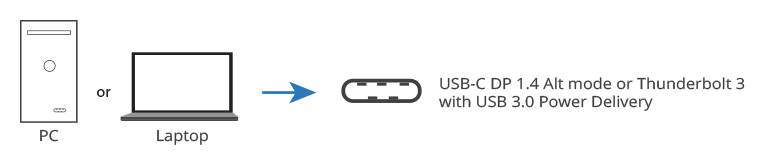
2. Check the extended displays/monitors resolution that support 4K@60Hz and have a HDMI port. If you are not sure, please check with the manual of the monitor
* Note: If your extended display/monitors display 4K@30Hz or 1080p, that means they don’t have DP 1.4 DSC

3. Install the latest drivers for your video card. Go directly to the system/video card manufacturer or chipset owners, such as AMD, Nvidia, or Intel, to find the latest driver
4. Before charging your laptop, notebook, tablet, and smartphone, please check your cable with power delivery 3.0, then it can handle up to 60W and will go to 96W using a full-featured USB Type-C
USB-C Dual Video MST Docking Station with 60W Power Delivery

Dual 4K HDMI displays with MST technology, multiple connections, and 60W PD by a single USB-C with DP 1.4 Alt mode input to increase your work efficiency

4K Video Resolution - Supports Ultra HD video resolution up to Dual 4K (3840x2160) @60Hz with DP 1.4 DSC or Dual 4K (3840x2160) @30Hz without DP 1.4 through two HDMI video output ports


3 Display Modes - Mirror mode, Extended mode, and Primary mode

Multiple Connectivity Port

Connection

Ingenious detachable design allows vertical or horizontal configuration and premium aluminum housing provides efficient heat dissipation design for reliable performance and increase efficiency

Key Prerequisites for SIIG MST Hubs

Adjust Screen Resolution Tutorial

| Chipset | VMM5200, RTL8153, AU84612, VL822 Compliant with Universal Serial Bus 3.1, 3.0 and 2.0 specification |
| Video | x2 HDMI Ports with DP 1.4 DSC: 4K@60Hz, cable up to 5M with DP 1.4: 4K@30Hz, cable up to 5M with DP 1.2: 1080p@60Hz, cable up to 10M |
| USB | |
| USB-C | x1, data transfer rate up to 10Gbps, 5V/1.5A charging |
| USB-C | x1, data transfer rate up to 10Gbps |
| USB-A | x1, data transfer rate up to 10Gbps, 5V/1.5A charging |
| USB-A | x1, data transfer rate up to 5Gbps, 5V/900mA |
| Fast Charging Port | Yes |
| Audio | 5.1 channel surround sound from HDMI output. 2 channel stereo audio from 3.5mm audio/microphone jack. |
| Display Mode | Mirror, Extended, Primary video modes (macOS only supports Mirror mode) |
| Power | |
| Power Delivery 3.0 | Up to 85W via USB-C port (Host) |
| Power Adapter | Input: AC 100-240V/50-60Hz; Output: DC 20V/5A, UL listed 100W/Level VI |
| Ethernet | - Data transfer rate up to 1G (1000Mbps), backward compatible with 10/100Mbps. - Supports IEEE 802.3x Full Duplex flow operation. - Compatible with IEEE 802.3, 802.3u. - Wake-on-LAN and PXE boot. *Note: Mac address pass-through not supported. |
| Interface | |
| Input | 1x 24-pin, USB-C with DP 1.4 Alt mode, Female (Host) 1x DC power jack (DC 20V/5A) |
| Output | 1x 19-pin, HDMI with MST technology, Female 1x 24-pin, USB-C, 10Gbps, 5V/1.5A charging, Female 1x 24-pin, USB-C, 10Gbps, Female 1x 9-pin, USB-A, 10Gbps, 5V/1.5A charging, Female 1x 9-pin, USB-A, 5Gbps, Female 1x 8-pin, RJ45, Gigabit Ethernet, Female 1x 3.5mm Headset jack, stereo audio & mic 1x SD 3.0 memory card slot 1x Micro SD (TF) 3.0 memory card slot |
| Product | |
| Dimensions (L) x (H) x (W) | 7.09" x 0.75" x 3.03" 18.00 cm x 1.90 cm x 7.70 cm |
| Weight | 0.71 lbs (0.32 kg) |
| Color | Black |
| Housing | Aluminum |
| Unit Package | |
| Dimensions (L) x (H) x (W) | 10.43" x 1.85" x 7.40" 26.50 cm x 4.70 cm x 18.8 cm |
| Weight | 2.45 lbs (1.11 kg) |
| Master Carton | |
| Dimensions (L) x (H) x (W) | 15.55" x 10.24" x 11.22" 39.50 cm x 26.00 cm x 28.50 cm |
| Weight | 25.57 lbs (11.60 kg) |
| Quality | 10 pcs/ctn |
| Environmental Conditions | |
| Operating Temperature | 32° to 104° F |
| Storage Temperature | -4° to 140° F |
| Relative Humidity | 20% to 90% RH (non-condensing) |
| Certifications/Standards | FCC, CE, RoHS 2.0, Reach |
| UPC Code | 662774-045078 |
| Warranty | 2 years limited |
| Country of Origin | China |
| System Requirements | - Desktop or Laptop with an available USB-C with DP 1.4 Alt mode or Thunderbolt 3/4 port - Compliant with mac® M1, M2, M3 Pro, & Max systems for single extend video output - Windows® (Intel/AMD/Snapdragon) 11 (64-bit) / 10 (32-/64-bit) / 8.1 (32-/64-bit) / 8 (32-/64-bit) / 7 (32-/64-bit) - macOS® 12 / 11 / 10.15 to 10.13 * Note: macOS® 10.13.4 to 10.13.6 is not supported, it’s recommended to upgrade to10.14 or later or stay with 10.13.3 and earlier |
| Package Contents | 1x USB-C Dual Video MST Docking Station with PD Charging 1x USB C to C cable 1x Power Adapter, 24V/4A 1x Vertical stand 1x User reference guide |
Q1: Can I use this to connect a 3rd monitor to my AIO (All-in-One PC)?
Q1: Can I use this to connect a 3rd monitor to my AIO (All-in-One PC)?
Need help?
Contact usManuals
Need help?
Contact us
USB-C Dual Video MST Docking Station with PD Charging
SKU
Spec
Features
Form Factor
Color
Housing material
Dimensions
Weight
Cable Management
Mountable
VESA Mounting Hole Pattern
Detachable VESA Plate
Max. Screen Size
Max Arm Capacity
Max Arm Lift
Max Arm Extend
Tilt Range
Swivel Range
Rotation
Spring type
Resolution
Supported External Displays
Audio spec
Connection port
Bandwidth
Data Transfer (Max)
Protocol
Antenna spec (3dBi / 5dBi)
Frequency
Distance
Additional function
Reset key
IR function
Remote control
EDID button
Power Adapter
Power Indicator
Power Delivery
Power Output (Max)
Protection
Certifications/Standards
Warranty
Country of Origin